

Managing Audiences
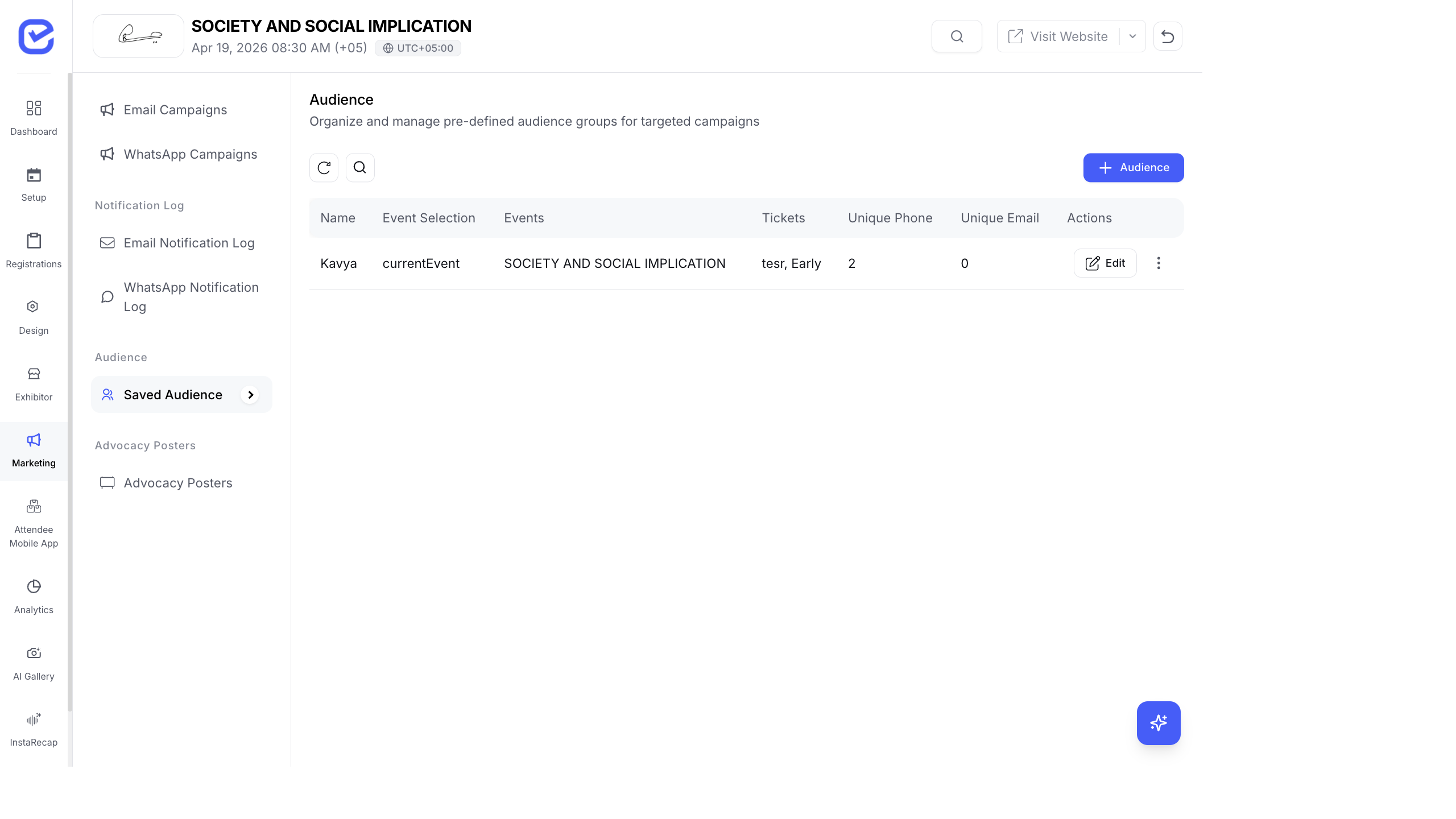
Audiences are saved segments of attendees that you can reuse across multiple campaigns. Instead of rebuilding filters every time, create an audience once and select it whenever you send a new campaign.
Create a Saved Audience
Section titled “Create a Saved Audience”- Go to Marketing → Audiences.
- Click + New Audience.
- Enter the Audience Name — descriptive name like “VIP Ticket Holders” or “Tech Conference 2024 Attendees”.
- Configure the filters:
- Event Selection — Current Event or Previous Events
- Events — select one or more events (for previous events)
- Tickets — select specific ticket types using the card selector
- The system calculates:
- Unique Phone Count — how many unique mobile numbers match
- Unique Email Count — how many unique email addresses match
- Click Save.
Audience Filters
Section titled “Audience Filters”| Filter | What It Does |
|---|---|
| Current Event | Includes registrants of the current event only |
| Previous Events | Includes registrants from selected past events |
| Ticket Selection | Narrows to specific ticket types (e.g., VIP, Speaker, Free) |
| Exclude Already Registered | Removes people who already registered for the current event (useful for re-engagement campaigns) |
Using Audiences in Campaigns
Section titled “Using Audiences in Campaigns”When creating a campaign:
- At the audience step, select Saved Audience.
- Choose your audience from the dropdown.
- The audience count auto-fills.
- Proceed with the rest of the campaign wizard.
You can also build audiences on the fly using the Inline Builder during campaign creation. These inline audiences are not saved for reuse.
Audience Examples
Section titled “Audience Examples”Here are commonly used audience segments:
| Audience Name | Configuration | Use Case |
|---|---|---|
| All Current Attendees | Current Event → All tickets | General announcements |
| VIP Ticket Holders | Current Event → VIP ticket only | Exclusive perks, lounge access |
| Previous Year Attendees | Previous Events → select last year | Early bird promotions for returning attendees |
| Free Ticket Registrants | Current Event → Free tickets | Upsell to paid tickets or add-ons |
| Speakers & Panelists | Current Event → Speaker ticket | Speaker logistics, slide deadlines |
| Non-Returning Attendees | Previous Events → all + Exclude Already Registered | Win-back campaigns |
Best Practices
Section titled “Best Practices”- Name audiences clearly — use descriptive names that your team can understand. “Segment 1” tells you nothing; “Dubai Tech 2024 VIP Holders” tells you everything.
- Create audiences early — build your audience segments before creating campaigns. It’s faster to select a saved audience than to rebuild filters.
- Review counts before sending — always check the unique phone/email counts before using an audience. If the numbers look wrong, check your ticket selection.
- Reuse across campaigns — a well-built audience can power your entire campaign sequence: save-the-date → early bird → reminder → last chance → thank you.
- Clean up old audiences — delete audiences from past events that you won’t reuse to keep your list manageable.